• Gemini Does Make Mistakes

    Gemini Does Make Mistakes

    Yesterday, I wrote a post about my great experience using Google AI, especially Gemini (which you can read here). Well, I ran into a problem using the chatbot today, which reminded me that Gemini does make mistakes. However, the mistake I ran into forced me to research and learn so there is a silver lining. I’ll explain that in more detail a little later in this post.

    When It Comes To Code Snippets Gemini Does Make Mistakes

    Allow me to set up the scene: I’m writing code for my backup program (which I will discuss in a future post), and I wanted to know the following:

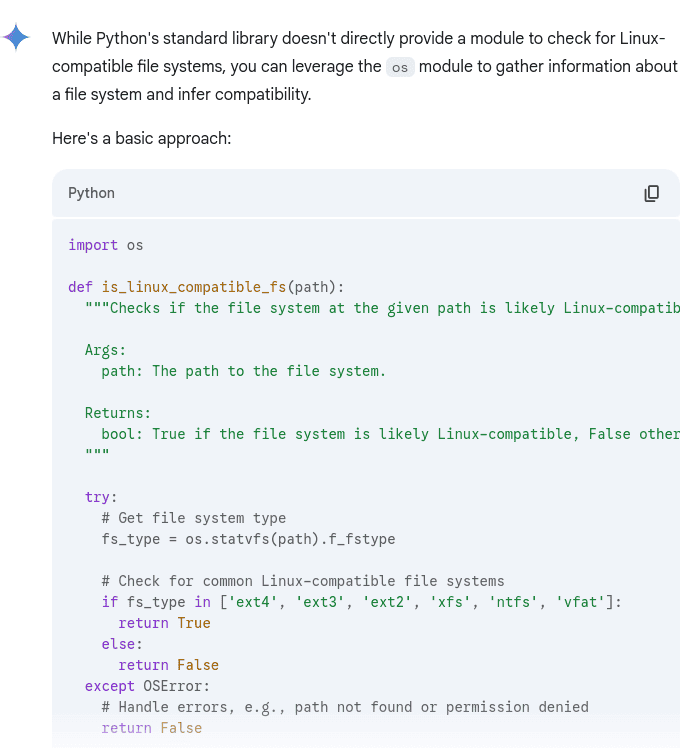
    My prompt in Gemini: "Is there a Python module I can use that checks for a Linux-compatible file system?"

    This is Gemini’s reply:

    The reply from Gemini that shows incorrect Python code.

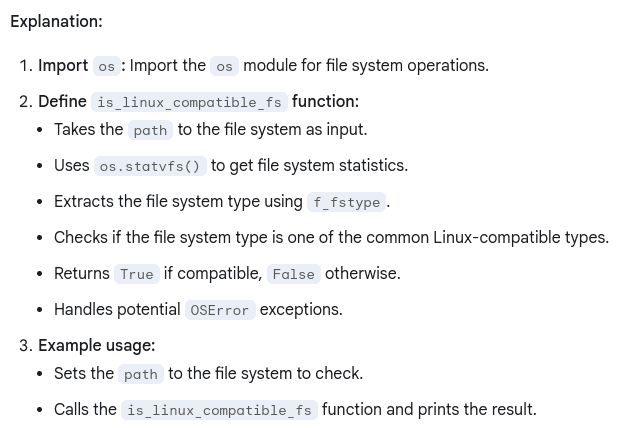
    I read through the explanation about the code provided:

    The explanation of the Gemini reply about the Python code snippet it supplied.

    I wasn’t going to copy the code and paste it into my Integrated Developer Environment (IDE) without knowing what it did first. That’s tempting, don’t get me wrong, but I want to understand what the code does. That way I can learn and use that knowledge to writing better code in the future.

    So after understanding what the function did I customized the code for my project. Then I ran into a problem: My IDE (PyCharm) didn’t have “f_fstype” in the autocomplete. I thought I made a typo so I retyped it. That didn’t work. I turned to Google Search and searched to see if this was a problem with my computer or even PyCharm. There wasn’t a problem with my setup.

    I finally visited the official Python documentation and found the entry regarding os.statvfs(), read about the options the module used and “f_fstype” wasn’t one of them.

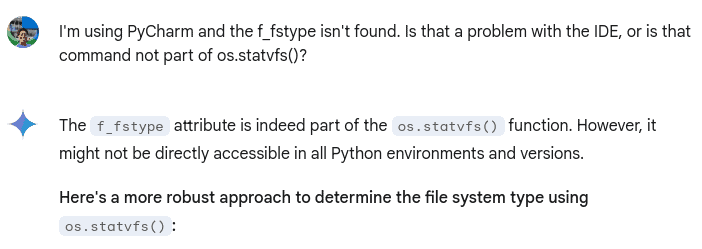
    I went back to Gemini and asked if “f_fstype” was part of os.statvfs() and the chatbot said it was:

    My question to Gemini about the Python code it provide, and its incorrect reply.

    As you can see Gemini does make mistakes and can double-down on them. So what did I do?

    I Left Feedback

    I left negative feedback about this answer because it’s incorrect. Then I provided a link to the official Python documentation that shows all the available options for the os.statvfs() module.

    This is important because Gemini, like any other Large Language Model (LLM) learns. There’s a possibility it learned incorrect information just like you or I would. And when I find out I learned wrong, I go to learn the correct information. Gemini needs to do that too. Thus, leaving feedback is so vital.

    So Gemini Does Make Mistakes…And Makes Me Think

    When I got the incorrect information I had to rethink my solution for my problem. I did use Gemini again for assistance, but first I wanted to think about how to approach the problem. I used some Linux commands on my computer like “stat” and wondered if I could use that to gather the information about the file system on a disk.

    While this setback could have discouraged me, I didn’t let it. Writing code, programming a computer, developing software, whatever you want to call it is about solving a problem. Sometimes the problem is straight-forward, other times it’s not. Becoming a great code or programmer or Software Engineers is about finding a one or more solutions to a problem. That’s what I learned from this situation.

    So thanks, Gemini!

  • Writing Code With Google AI: My Experience So Far

    Writing Code With Google AI: My Experience So Far

    I’m currently in the midst of coding my latest technical project: A backup program only for Linux distros that performs either a full backup or a partial backup of the user’s Home Directory. So far I’ve made great progress with the code, in part because I’m writing code with Google AI. I know there is a big debate whether AI chatbots help or hinder developers, especially Junior Developers. However, my experience so far has been positive, and I’m using this post to explain why.

    Writing Code With Google AI: It’s Better Than Using Search For Long (Or Complex) Questions

    The main reason I’m making great progress with my project because Google AI, especially Gemini, understand my longer questions better about Python modules and features better than Google Search.

    I still do think that Google Search has its place for quick questions, but Gemini is so much better when it comes to asking longer questions about coding issues.

    For example: I wanted to know if it was possible in Python to validate a path to a directory provided by the end user through user input. Gemini was able to formulate an answer to that question within seconds, and provide example code I could use in my project! Oh, and the chatbot explained what each line of code did! Thus, I got a learning lesson and code I could use.

    I find myself learning more about the Python programming language and its built-in functions and/or modules I can use through Gemini than reading through the official Python documentation. Not to say I don’t read the documentation because I do. Especially when I want to use a specific flag or option. However, I find myself turning to Google AI more and more often to provide a different, and sometimes simpler, explanation on how to use certain modules or functions.

    Writing Code With Google AI: It Understands My Code And Provides Good Suggestions For Improvement

    Writing code with Google AI is like having access to a Senior Developer who not only understands my code and what you’re trying to accomplish, but also provides improvements and explains why I should use them.

    My backup program is going to run the rsync command to run the backup. In my original design I use the os.system module to run the command. I provided this snippet of code to Gemini for help for some reason. Unfortunately, I’ve forgotten now. The chatbot came back with the answer to my question, but then suggested I use the subprocess.run module instead because it offered between security and performance.

    I took this information and did my own research because I wanted to learn more about what the subprocess module was in Python, and how it worked. And in my research I discovered Gemini was correct.

    That’s why I’m excited for this technology: It is helping people do more than ever before faster!

  • The Infected Land: A CLI Game I Wrote In Python

    The Infected Land: A CLI Game I Wrote In Python

    I recently created, and updated a new technical project that’s available to download from this GitHub repo: The Infected Land. In this post I will discuss the following topics about this web application:

    1. Why I created it
    2. The code running it
    3. My future plans for the game

    Why I Created The Infected Land

    The main reason I created this game because I wanted to practice my Python skills after taking various refresher courses on YouTube. (You can read why I refreshed my skills here.) I wanted to practice both Object Oriented Programming (OOP) and taking in user input. Creating a game seemed the easiest, and most fun, option for me. Plus, it gives me the chance to write a story and some character development since I had to put writing to the side to focus on programming.

    The Game’s Storyline

    The Infected Land is a Command Line Interface (CLI) game where you (as the Hero) must defeat the Villain’s evil creations to cleanse the infection harming the land and its residents.

    There are three battles in the game:

    1. Beast battle
    2. Non-beast battle
    3. Human battle

    As the player progresses through the game an malevolent voice of the VILLAIN appears. The player learns more and more about the VILLAIN, and even about Hero.

    There is also a chance after ever battle for the Hero to restore a portion of their health, and improve their battle gear by choosing a more powerful sword or better armor.

    The final battle of the game pits the Hero against the VILLAIN. If the Hero succeeds then the land will heal from its infection for good, and the residents can live in peace!

    The Code Running The Infected Land

    Classes

    There’s quite a bit of code running the game. First, I’ll review the two Classes: Hero and Villain.

    Both classes have a similar Constructor function setup:

    class Hero:
        def __init__(self, name: str, class_type: str, race_type: str,         weapon_type: str, weapon_damage: int, armor_type: str, armor_defense: int, health: int)
    class Villain:
        def __init__(self, name: str, class_type: str, race_type: str, beast_type: str, weapon_type: str, weapon_damage: int,              armor_type: str, armor_defense: int, health: int)

    The major difference between the two Classes is that the Hero class’ “name” parameter can be modified by user input. If the user doesn’t provide a name, I created some code to give the player a default name of “HERO.”

    The Hero class contains the methods that takes in the user’s input to fight the evil creature in each battle. Here’s a snippet of the code for the Beast battle, which is the first battle in the game:

    def hero_attack_beast(self) -> None:
            """Takes input from the player to attack the beast Villain.
            :return: None
            """
            random_num = random.randint(0, 1)
            print()
            print(center_text("-" * 80))
            print(center_text(f"{hero.name}, choose your action: (A) Attack or (B) Block."))
            print(center_text("-" * 80))
            print()
            user_input = input("Enter your choice here: ").capitalize()
            try:
                if user_input == "A":
                    if random_num == 0:
                        print()
                        print(center_text(f"!! {hero.name} slashes at the {random_beast.name} with their sword !!"))
                        attack_sleep_print()
                        print()
                        print(center_text(f"-- {random_beast.name} fails to dodge the attack --"))
                        attack_sleep_print()
                        print()
                        print(center_text(f"!! {self.weapon_type} does {self.weapon_damage - random_beast.armor_defense} points of damage !!"))
                        random_beast.health -= (self.weapon_damage - random_beast.armor_defense)
                        print()

    The user’s input is connected to a random number to determine if their attack or block is successful. I wrapped the user’s input in a “Try/Except” clause to deal with incorrect input. If the user does provide incorrect input, a message appears on a screen and the battle function appears again.

    As for the Villains, their attacks are automated and connected to a random number to determine if their attack was successful. Here’s a snippet of that code:

    def beast_attack_hero(self) -> None:
            """Attacks the Hero with a random beast.
            :return: None
            """
            from hero import hero  # Placing the import statement here to avoid a circular import error
            random_num = random.randint(0, 1)
            print(center_text("*" * 80))
            print(center_text(f"!! {self.name} attacks {hero.name} with its {self.weapon_type} !!"))
            print(center_text("*" * 80))
            attack_sleep_print()
            if random_num == 0:
                print()
                print(center_text(f"-- {hero.name} fails to block the attack with their shield --"))
                attack_sleep_print()
                print()
                print(center_text(f"!! {self.weapon_type} does {self.weapon_damage - hero.armor_defense} points of damage !!"))
                hero.health -= (self.weapon_damage - hero.armor_defense)

    The battle runs as so:

    1. The random Villain for the battle attacks the Hero first
    2. Then the Hero gets their turn to attack or block.
      • If the Hero chooses to block and it’s successful, that stuns the Villain and the Hero gets to attack again
    3. Then the random Villain attacks.
    4. The battle continues to run like this until either the Hero or the Villain dies.

    Text Formatting Tools

    Since this is a CLI game good text formatting is vital to a good player experience. I chose to center the text on the screen, except user input, because it looked better to me. However, I ran into a challenge at first because each player may have a different default size for their Terminal window. With the v0.1 version of the game I used the built-in “.center()” function. While that was kinda successful, the manual padding was too cumbersome.

    While building out the v0.2 version of the game I went back to Google to find better techniques on how to center the text in Python. This time I hit the jacket with the Generative AI response because it provided this bit of code:

    def center_text(text, width=None) -> None:
        """Centers the displayed text in the terminal window.
    
        :param text: The text displayed on the terminal window.
        :param width: The width of the end user's terminal window.
        :return: None
        """
        if width is None:
            width = os.get_terminal_size().columns
        return text.center(width)

    I added the comments, but basically the code uses the “os.get_terminal_size” function to get the number of columns of the terminal window. Thus, it centers the text depending on the width. I tried this out with multiple types of column sizes and it works well!

    I created other functions to delay the amount of time the text appears on screen. That way it gives the player enough time to read and follow the story.

    Wow, this post is getting long. To see the full code running this game please visit the repo here.

    My Future Plans For This Game

    After releasing v0.2 of the game I’m pretty much done for what I wanted to accomplish with the game. I don’t see myself adding any additional content to it. Instead, I’ll probably make a new game like one of those old school CLI dungeon crawlers.


  • CS50x C Programming Lecture Is No Longer Complicated For Me

    CS50x C Programming Lecture Is No Longer Complicated For Me

    I wrote about my experience watching the CS50x C programming lecture in a previous post. You can read it here, but I will give a TL;DR: The course’s reliance on custom files and functions hampered my learning. Thus, I stopped watching the lecture series and searched for a video to learn the programming correctly. After watching another video I decided to give the lecture another shot. I wanted to see if I could follow along now. Turns out I could! I’ll explain why and how.

    How The CS50x C Programming Lecture Isn’t Complicated For Me Anymore

    This video from the Bro Code YouTube channel made C programming easy to understand and and use. It’s fun to write the code in VS Code, and create different types of functions using the language. I also created my first segmentation fault by not calling my variable correctly in the printf function! So that makes me a real programmer, right?

    All joking aside, I really do like this video from Bro Code and I’m about third of the way through the 4 hour video. So there’s still plenty of material for me to cover. However, I’m not waiting to finish that video to go back to the CS50x C programming lecture.

    What I’m doing is learn some topics from the Bro Code video, and then go back to the lecture to watch how the instructor presents those same topics. This is easy to do because both video utilize the chapter feature in YouTube. That leads me to why I understand things so much better now.

    Why The CS50x C Programming Lecture Isn’t Complicated For Me Anymore

    The reason why I understand the lecture much better now because I understand what the CS50x’s custom headers and custom function does. That’s why I wanted to learn the proper way to learning the C programming language. As I stated in my previous post, I’m not going to use custom headers and/or custom function like get_string in my code. I’m going to use the code’s built-in headers and functions. Hmm…there could be a future situation where I work for a company using their own set of custom header files and functions. Maybe this is good practice for me after all.

  • YouTube University: My Experience Using It To Learn Coding

    YouTube University: My Experience Using It To Learn Coding

    I discussed in a previous post about my usage of YouTube University to improve my coding skills. While I love the platform there are some pros and cons to using it to learn anything, including programming languages.

    Pros Of YouTube University

    It’s Free

    The biggest pro for this platform is that it’s free! It’s that way due to ads. Yes, I know people don’t like ads, myself included, but YouTube is quite expensive to run so it needs to make money somehow to keep delivering content. It’s worth it in my opinion, however. It allows people from all over the world to learn about different topics, or upload content to teach others.

    Basically Unlimited Choice Of Content

    Speaking of content there’s basically an unlimited choice for any type of learning. That’s why I love using it to improving my coding skills. I can learn different programming languages, or do a deep-dive into a particular language. If I get tired of that, I can learn how to write efficient code, or broaden my understanding of data structures. Really, I’m only limited by my search queries.

    It’s Easy To Try Out Content

    Unlike other online video platforms like Udemy, it’s incredibly easy to try out different types of learning for a particular category or different categories. I don’t have to purchase another course, or extend my subscription.

    Cons Of YouTube University

    Plenty Of Outdated Content

    This is the biggest con for me regarding YouTube University because I find myself wasting time on outdated content. Especially if I’m trying to follow along with a tutorial, utilize a snippet of code, or try out an application. That’s why I try to watch videos under one to two years old, but that does exclude good content sometimes.

    Outdated And Recent Information In Videos

    Then I find that some recent videos include both outdated and recent information in them. Again, I only discover this when I try to implement a technique in my code editor, or want to try out an interesting bit of software.

    Creators Pushing Viewers To Their Paid Content

    I have no problems with a creator offering paid content because they need to make a living too. However, when a creator becomes too pushy, or only offers a sliver of their content for free, I get a little upset. I think it would be better to create free, but informative videos, that then advertise paid content. That way I can determine if that creator is worth a financial investment from me.

    Poor Audio/Video Quality

    I still find videos that have either poor audio or video quality, or both. It’s distracting and causes me to leave the video almost immediately.